
ETAS ISOLAR
Beta
Beta feature. Report issues via Bug report.
AutoC reads and writes ECUC configuration through ETAS RTA-CAR / ISOLAR-B. You need the ISOLAR install directory and project path (contains .project and EcucValueCollection_Generated.arxml). Start from the project root.
Tested versions
| RTA-CAR / ISOLAR-AB |
|---|
| RTA-CAR 9.2.0 / ISOLAR-AB 9.2.0 |
| RTA-CAR 12.1.2 / ISOLAR-AB 12.1.2 |
On first use, AutoC installs the ISOLAR-B plugin automatically. No extra setup is needed in most cases.
Other platform versions
If your ISOLAR-AB / RTA-CAR version is not listed above and /etas verify fails, please contact us so we can evaluate support.
Quickstart
- Go to the RTA-CAR project root and start AutoC:
cd D:\projects\my-rtacar-project
autoc- Set paths:
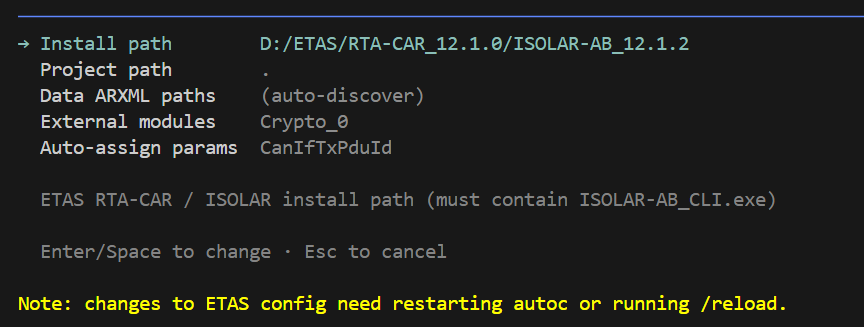
/settings→ ETAS ISOLAR:
| Field | Value |
|---|---|
| Install path * | ISOLAR-AB install root (contains ISOLAR-AB_CLI.exe); or set ISOLAR_HOME |
| Project path * | Leave empty; uses current directory |
| Data ARXML paths | Optional; leave empty to auto-scan ecu_config/** for *_EcucValues.arxml |
| External modules | Optional; EB+ETAS mixed projects — see EB and ETAS sync |
| Auto-assign params | Optional; param SHORT-NAMEs auto-assigned at generate (e.g. CanIfTxPduId); see below |
* Required
- Press
Esc, then/reload.
Success: an ETAS ISOLAR line in the startup area. Fields: Settings — ETAS ISOLAR.
Commands
| Command | Purpose |
|---|---|
/etas | Menu: verify / generate |
/etas verify [module] | Write ECUC ARXML, then bswval; omit module for all |
/etas generate | Write ECUC ARXML, then generate |
No separate ETAS save command — save happens before verify/generate. For mixed EB projects, save MCAL with /eb save.
Advanced
Data ARXML — ECUC value files (data source for get_value / set_value). Auto-discovered by default; set etas.dataArxmlPaths for complex layouts (paths relative to project root). Different from System Template — see System Template.
Auto-assign params (etas.autoAssignParams) — Some scalar ECUC parameters fail verify with missing values, but ISOLAR assigns them automatically at generate; you cannot and should not set them by hand (e.g. CanIfTxPduId).
- Symptom:
/etas verifyreports multiplicity / missing-value errors while the field stays empty in ISOLAR GUI until generate. - Configure:
/settings→ ETAS ISOLAR → Auto-assign params (comma-separated SHORT-NAMEs), oretas.autoAssignParamsinsettings.json. Then/reload. - Effect: Hidden from schema trees (
get_value/set_value);etas_verifyignores missing-value errors for listed params.
"etas": {
  "autoAssignParams": ["CanIfTxPduId"]
}
Full field list: Settings — ETAS ISOLAR. Still failing verify: Troubleshooting — verify missing param.
Mixed projects — EB and ETAS configuration sync.
Troubleshooting: missing Java compiler
Most users can skip this section. Follow it only if AutoC reports that no Java compiler was found.
Check the Java that ships with ISOLAR first, then download a matching JDK.
1. Check ISOLAR’s Java version (replace with your Install path):
# Try this first (common on 9.2 / 12.x)
& "C:\ETAS\RTA-CAR_x.x.x\ISOLAR-AB_x.x.x\javalibs\jdk\bin\java.exe" -version

# If that path does not exist (common on 9.1, jre only)
& "C:\ETAS\RTA-CAR_x.x.x\ISOLAR-AB_x.x.x\jre\bin\java.exe" -version
Note the major version in the output, e.g. 1.8.0_… → 8, 11.0.x → 11.
2. Download and install a JDK with the same major version (must include javac, not a JRE-only package):
| Version you saw | Download |
|---|---|
8 (1.8.0_…) | Eclipse Temurin 8 |
| 11 | Eclipse Temurin 11 |
If -version fails or the output looks wrong, install JDK 8.
3. Set JAVA_HOME to the JDK install folder (it must contain bin\javac.exe).
Temporary (current PowerShell window only):
$env:JAVA_HOME = "C:\Program Files\Eclipse Adoptium\jdk-8.0.xxx-hotspot"Permanent (then open a new terminal and restart AutoC):
setx JAVA_HOME "C:\Program Files\Eclipse Adoptium\jdk-8.0.xxx-hotspot"4. Confirm and retry:
& "$env:JAVA_HOME\bin\javac.exe" -versionStart AutoC again, or retry the action that installs the plugin (for example /etas verify).