
Windows setup
On Windows, in addition to Getting started, configure PATH, terminal, and Bash.
Quickstart
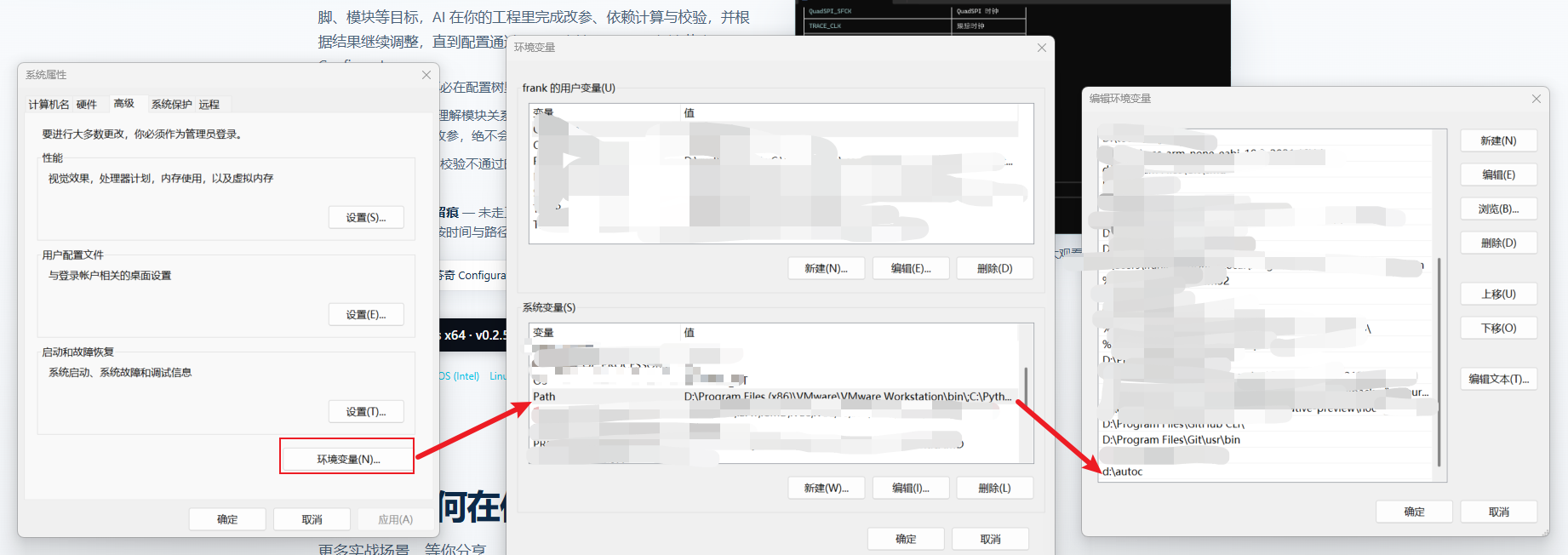
- PATH — Add the folder containing
autoc.exe(e.g.D:\software\autoc-windows-x64) to user or system Path. Reopen the terminal and runautoc --version.
Windows Terminal — Recommended (Microsoft Store or
winget install Microsoft.WindowsTerminal) for Unicode, image paste, andCtrl+Entermultiline input.Bash — AutoC needs bash for scripts and EB commands. Install Git for Windows to the default path (
C:\Program Files\Git); AutoC findsbash.exeautomatically.
Git outside default paths
AutoC resolves bash in order: shellPath in settings → C:\Program Files\Git\bin\bash.exe → C:\Program Files (x86)\Git\bin\bash.exe.
For custom installs (D: drive, Scoop, portable), set the full path to bash.exe in %USERPROFILE%\.autoc\agent\settings.json (e.g. C:\Users\YourName\.autoc\agent\settings.json):
json
{
  "shellPath": "D:\\Tools\\Git\\bin\\bash.exe"
}
Same for Cygwin / MSYS2. Restart AutoC after changes.
Advanced
- Backspace and path issues: Troubleshooting — Windows terminal
shellPathfield: Settings