
Using AutoC
Day-to-day usage. Install and login: Getting started.
UI
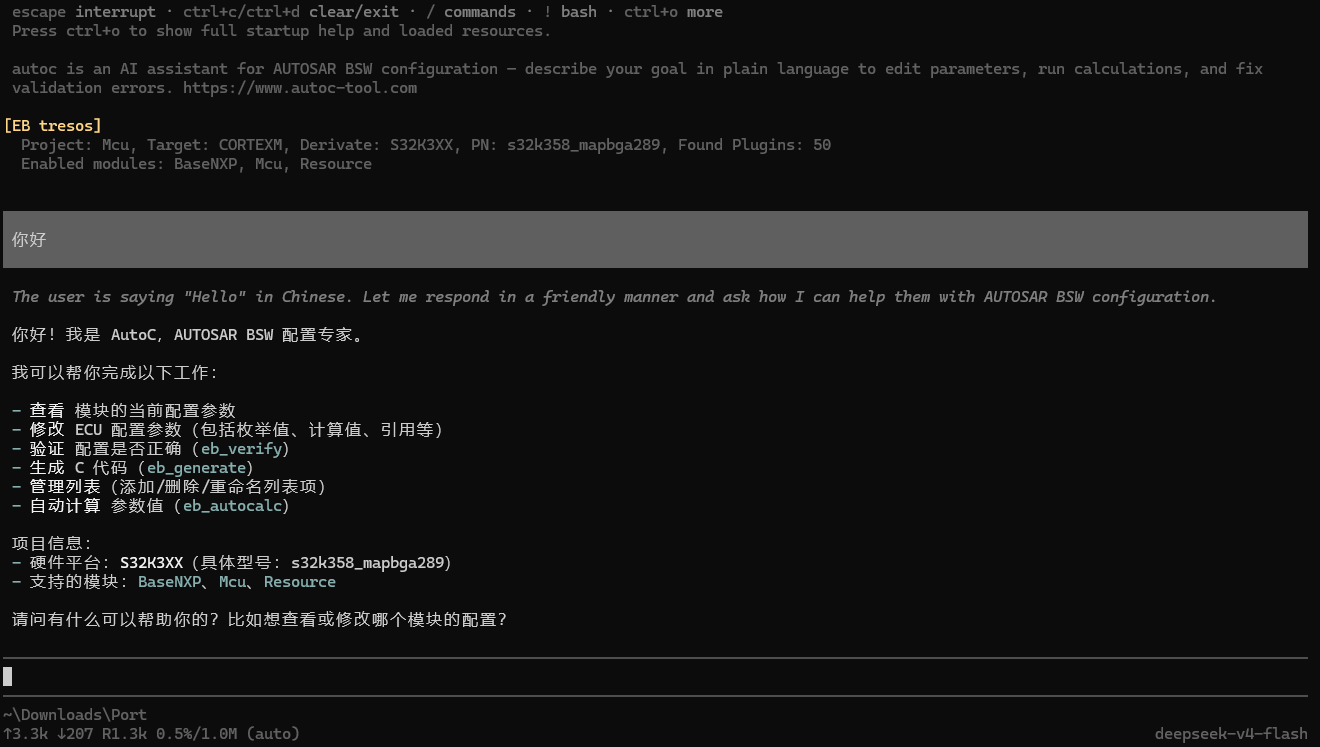
| Area | Content |
|---|---|
| Header | Shortcuts, context files, skills, extensions |
| Messages | Chat, tool calls, errors |
| Editor | Input (border color = thinking level) |
| Footer | Working directory, session, tokens, model |
Editor
| Action | Keys |
|---|---|
| File reference | @ fuzzy search |
| Multiline | Shift+Enter (Windows Terminal: Ctrl+Enter) |
| Images | Ctrl+V (Windows: Alt+V) or drag in |
| Shell | !cmd to model; !!cmd without model |
| External editor | Ctrl+G |
/hotkeys for all shortcuts; customize in Keybindings.
Slash commands
Type / for completion. Skills: /skill:name (Skills).
| Command | Purpose |
|---|---|
/login, /logout | WhyEngineer login / logout |
/model | Switch model |
/settings | Settings menu |
/reload | Reload config, skills, project |
/resume, /new | Resume / new session |
/session, /tree, /fork, /clone | Sessions — Sessions |
/compact | Compact context |
/export, /log, /share | Export session / change log / Gist |
/eb | EB tresos |
/davinci | DaVinci Configurator |
/etas | ETAS ISOLAR |
/system | System Template |
/quit | Quit |
Message queue
While the assistant is running:
- Enter — steering message (after current tool round)
- Alt+Enter — follow-up (after all work completes)
- Escape — abort and restore queue
Configure steeringMode and followUpMode in /settings.
CLI
bash
autoc [options] [@files...] [message...]| Common flags | Purpose |
|---|---|
-p, --print | Non-interactive, print and exit |
-c, --continue | Continue latest session |
-r, --resume | Pick a session |
--model <pattern> | Set model |
--modules <list> | Limit EB modules |
--no-session | Do not persist session |
bash
autoc -p "Summarize this repo"
autoc @screenshot.png "What's in this image"
Web subcommand: AutoC Web. Full reference below.
Full CLI reference
Modes
| Flag | Purpose |
|---|---|
| Default | Interactive |
-p, --print | Print and exit |
--mode json | JSON line events |
--mode rpc | stdin/stdout RPC |
--export <in> [out] | Export session HTML |
Models
WhyEngineer models only. Log in first.
| Option | Purpose |
|---|---|
--model <pattern> | Model ID or pattern, :thinking suffix |
--thinking <level> | off … xhigh |
--models <list> | Models for Ctrl+P |
--list-models [search] | List available models |
Sessions
| Option | Purpose |
|---|---|
-c, --continue | Continue latest |
-r, --resume | Browse sessions |
--session <path|id> | Specific session |
--fork <path|id> | Fork to new file |
--session-dir <dir> | Custom session dir |
--no-session | Do not save |
Tools and resources
| Option | Purpose |
|---|---|
--tools <list> | Enable listed tools only |
--no-tools | Disable all tools |
-e, --extension <src> | Load extension |
--skill <path> | Load skill |
--no-context-files | Skip AGENTS.md |
Environment
| Variable | Purpose |
|---|---|
PI_CODING_AGENT_DIR | Config dir, default ~/.autoc/agent |
PI_CODING_AGENT_SESSION_DIR | Session dir |
PI_OFFLINE / PI_SKIP_VERSION_CHECK | Skip network checks |
VISUAL, EDITOR | External editor for Ctrl+G |
Context files
Loads AGENTS.md / CLAUDE.md from ~/.autoc/agent/, cwd, and parents. System prompt: .autoc/SYSTEM.md or ~/.autoc/agent/SYSTEM.md.