EB ↔ DaVinci ECUC sync
In mixed projects, EB configures MCAL and DaVinci configures the Vector stack. When you /eb save, AutoC automatically writes the matching MCAL ARXML in the DaVinci project — no EB export + DaVinci import.
Quickstart
- Configure both paths per EB tresos and DaVinci Configurator, then
/reload - Edit EB modules in AutoC (e.g.
Mcu,Can_43_FLEXCAN) - Run
/eb save— updates EB XDM and DaVinciConfig/ECUCARXML
EB-only setup (no DaVinci) still saves XDM only.
Which command
| What you change | Save with |
|---|---|
MCAL (Mcu, Port, Can_43_FLEXCAN …) | /eb save (auto-syncs DaVinci) |
Vector stack (EcuC, PduR, Com …) | /davinci save |
Use EB module names in AutoC; DaVinci may show different labels (e.g. Can) — no manual mapping needed.
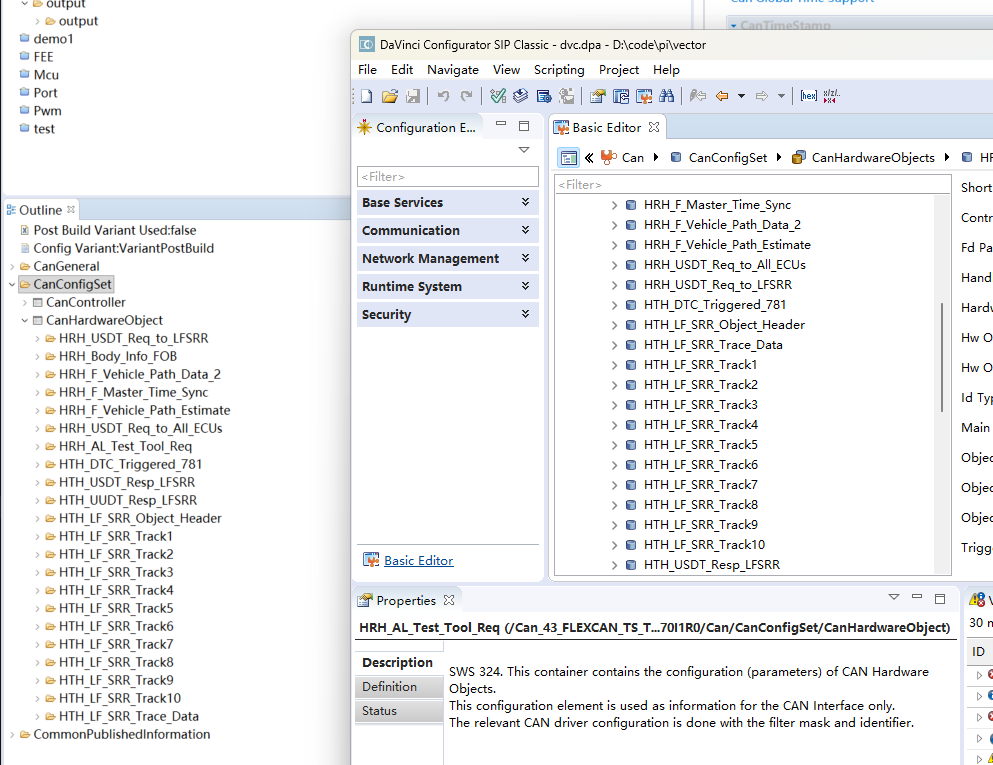
View in DaVinci GUI
Open Configurator after save. If the window was already open, refresh or reopen the project.
Prerequisites
- Start AutoC from a directory with both EB
.projectand DaVinci.dpa - Both paths point at the same vehicle project
EB + ETAS mixed mode: EB and ETAS configuration sync.